Photo or AI: how editors can recognize generated images, use them correctly, and label them fairly
NUJU11 minutes of reading
Share:
Artificial intelligence has already become a common working tool of media professionals. It can remove the background, extract a dark frame or restore an archive photo in seconds. At the same time, he creates convincing fakes that easily find their way into the news feed.
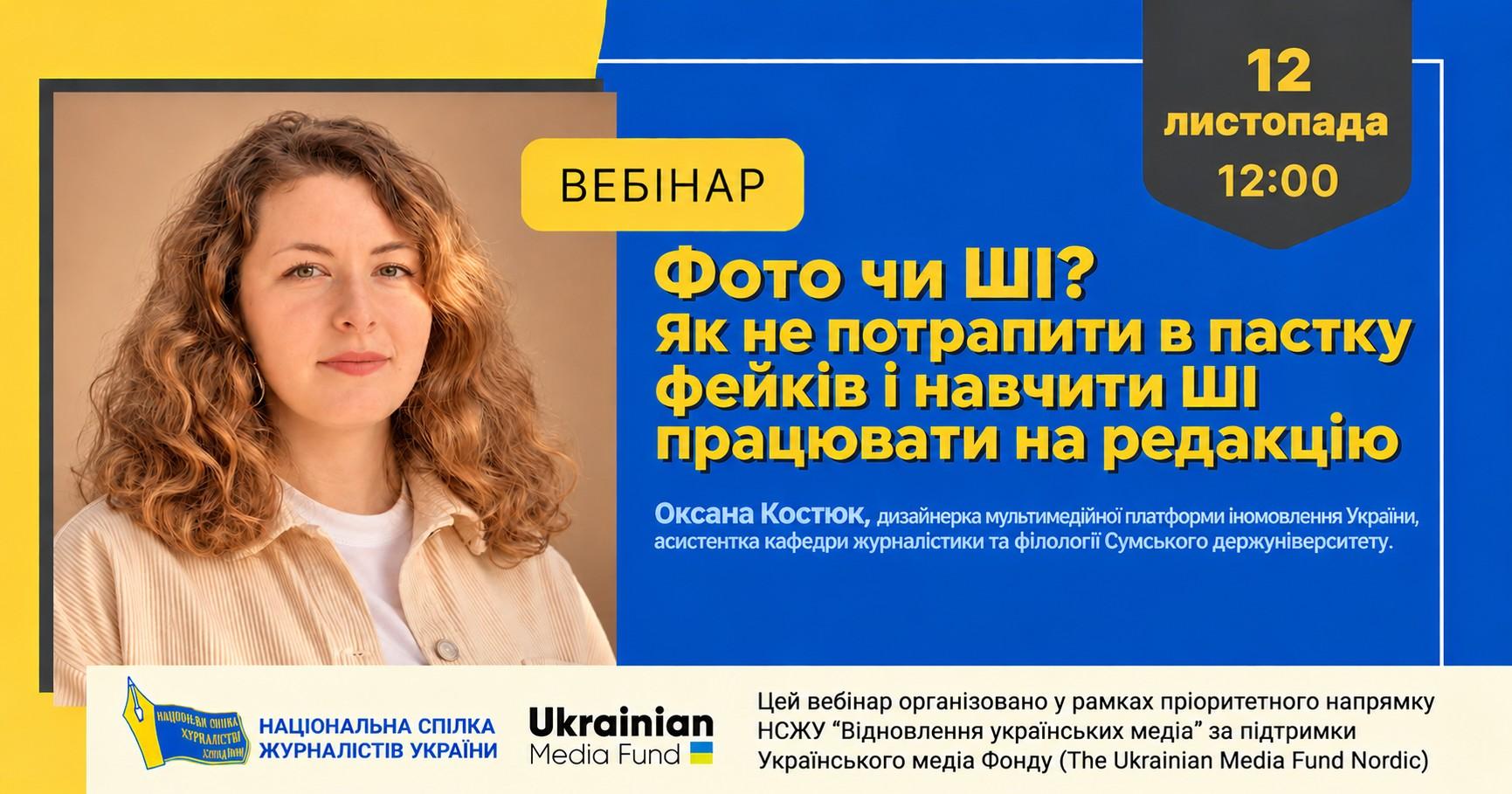
Oksana Kostiuk, designer of the multimedia platform "Ukrainian foreign languages", assistant of the Department of Journalism and Philology of Sumy State University, told where the line is between retouching and generation, how to check questionable pictures and how to sign processed images so as not to lose the reader's trust.
Oksana Kostyuk
How to talk to a neural network
Oksana Kostiuk advises to start any work with AI with a simple question: what do you need to get? Both the prompt (task for AI) and the marking depend on the answer.
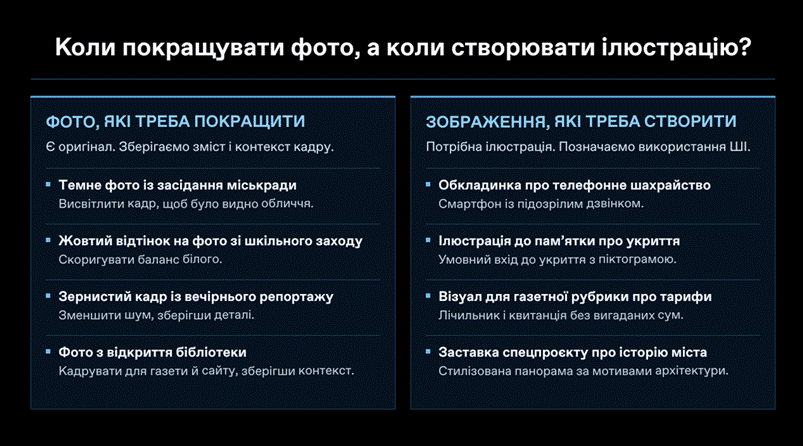
When a newspaper or digital media editorial office prepares a visual for publication, it all depends on the task at hand. If there is a real picture, AI helps to improve its quality and preserve the content of the frame. It performs typical graphic editor operations faster and without installing professional programs. For example, you can highlight a face in a photo from a city council meeting, adjust the yellow tint, or reduce the graininess of an evening report.
When an event, phenomenon or abstract concept needs to be conveyed, AI can create an illustration from scratch. For example, a cover for a material about phone fraud, a picture for a shelter memo or a visual about tariffs with counters and receipts without fictitious amounts.
The main advice of the speaker regarding retouching is that it is more important to write down what to leave unchanged than what to change. Then the space for change narrows, and AI works pointwise.
Here's how it's done in practice
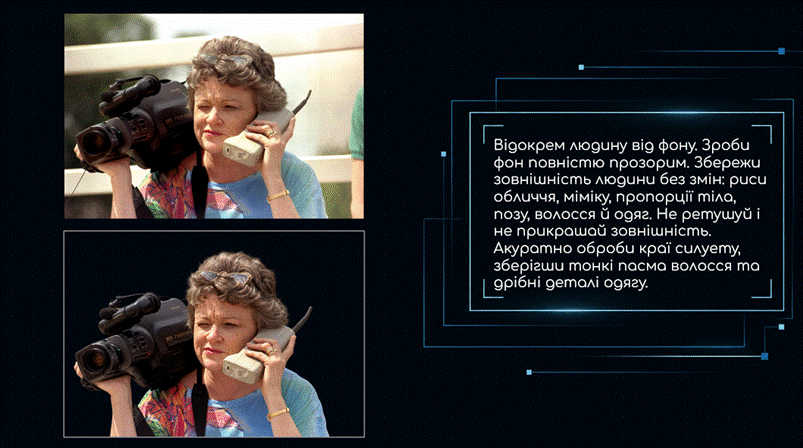
Removal of background and unnecessary objects. This used to take 15 minutes to an hour in Photoshop, now a neural network does it in seconds. Do not write "leave the person in the center, remove the rest", because then the AI will greatly change the environment around the hero. List what to remove: people in the background, cars, objects to the left and right. Separately, add that the hero must be kept exactly as it was in the original.
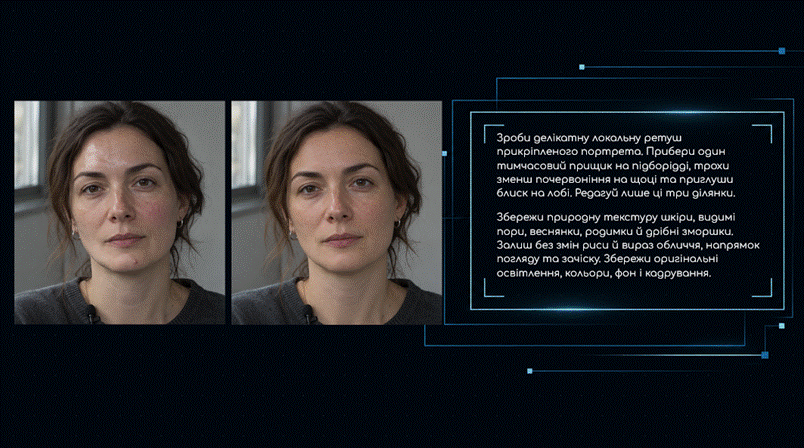
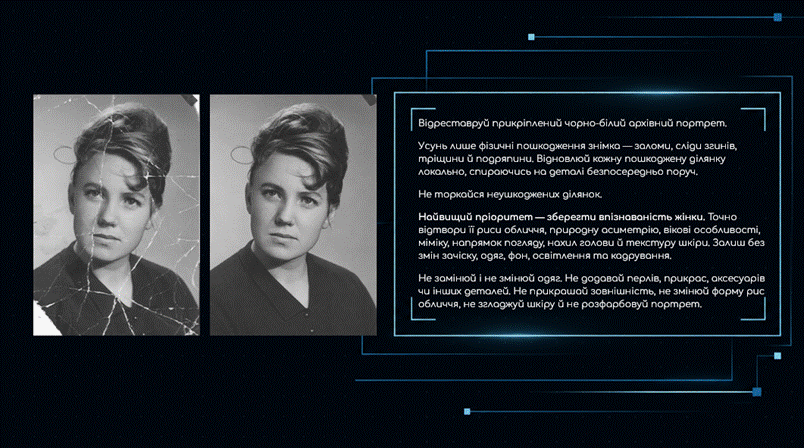
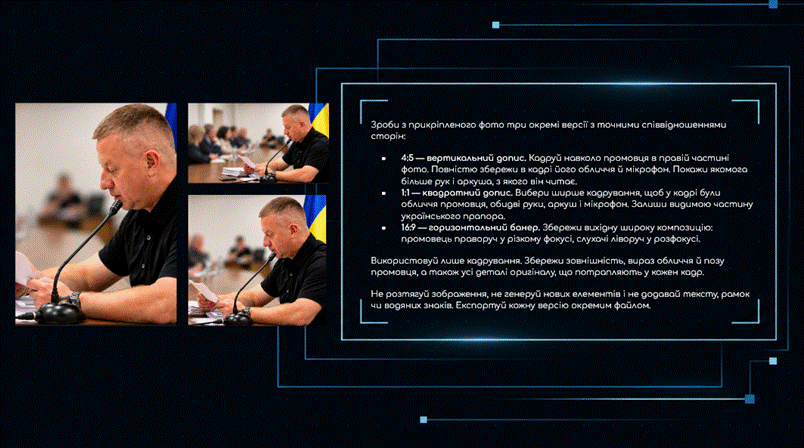
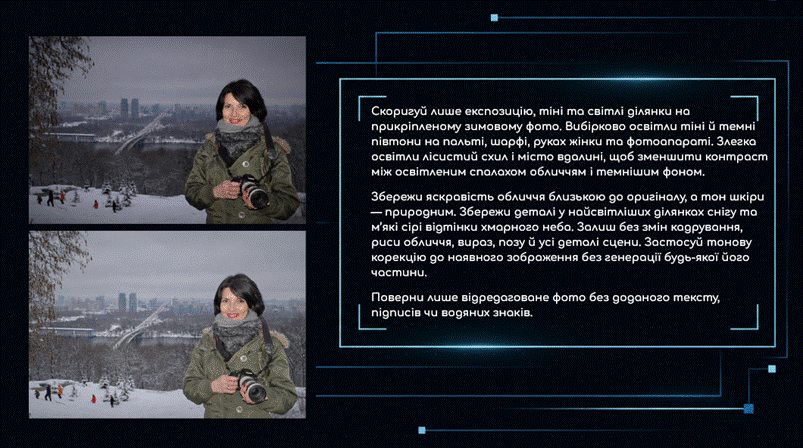
On this and other slides, Oksana Kostyuk provides sample prompts for improving photos
Portrait retouching. The goal is not a perfect picture, but a delicate retouch that is not visible at first glance. List what can be fixed (for example, pimples or a glare on the forehead) and record what remains unchanged: facial features and expression, gaze direction, hairstyle, lighting, background, framing.
Staffing. It should be prescribed almost always. It happens that the hero is deliberately placed on the right, because there is room for text on the left. The neural network will perceive this as a mistake, put the person in the center, or even make a square frame.
Color and noise. AI likes to "overdo it": it can whiten skin too much or destroy warm tones. Write directly: keep the natural skin tones, the warm tone of the wooden table, etc. For night photos, you can operate with technical parameters: "reduce digital noise from high ISO, especially in the shadows." Complete the prompt with what you want: "return only the corrected photo without added text, do not paint the details."
Old and damaged photos
The speaker advises to restore them in several stages. First, you need to remove the scratches, emphasizing that the most important thing is to preserve the recognizability of the person and the natural asymmetry of the face. It is also worth prohibiting changing clothes and jewelry, because the AI likes to "dress up" the hero or add a necklace. Wrinkles, cracks and texture of the fabric are already processed with the next prompt, based on the first result.
At the same time, not everything can be saved. If it is not visible on the scan where the person is looking, the neural network refines the look, and the result may no longer be similar to the original. Therefore, it is better to take the highest quality source for processing. The result should always be compared with the original. If the features have changed, go back to the beginning and edit in parts: face separately, clothes separately, background separately.
Frame expansion: the fine line between retouching and generation
The function of generative expansion (Generative Expand) allows you to make a vertical photo square or horizontal. Oksana Kostyuk called it the border between editing and generation.
Extensions should be set from the center. Otherwise, the AI can complete the space only from one side, where the hero is looking, and he will be at the edge of the frame. But the main thing is different. If clear people appear on the completed background, who were not actually present at the event, this is the generation of new content. Blurred silhouettes, which only show that the speaker is addressing the audience, can still be considered retouching.
The formula for an effective prompt
The speaker summed up: a good prompt consists of four parts. Object - what exactly needs to be changed in the photo. Action is a clear verb: remove, expand, level the light. Context - how to work: preserve lighting, remove noise, add depth. Restrictions - what is prohibited: change features, blur, make "plastic gloss".
The golden rule is as follows: the shorter and more precise the technical term, the less AI invents unnecessary things.
For generation from scratch, Oksana Kostyuk gave four more tips:
1. Write prompts in English. Neural networks understand Ukrainian, but work more accurately in English due to the direct order of words and the absence of interjections.
2. Describe what should be, not what should not be. Objections are relevant only when editing the finished photo.
3. Avoid "garbage" words like masterpiece, best quality, "masterpiece". AI should be talked to like a computer.
4. One request - one idea. Don't describe a plot with five characters in one prompt. Start with a character and environment, and add detail, color and mood in subsequent steps.
For illustrations, the speaker proposed the following structure: object, action, environment, style, light. If you add your own photo references to the request, such as a specific yard or objects, the AI will save them almost unchanged.
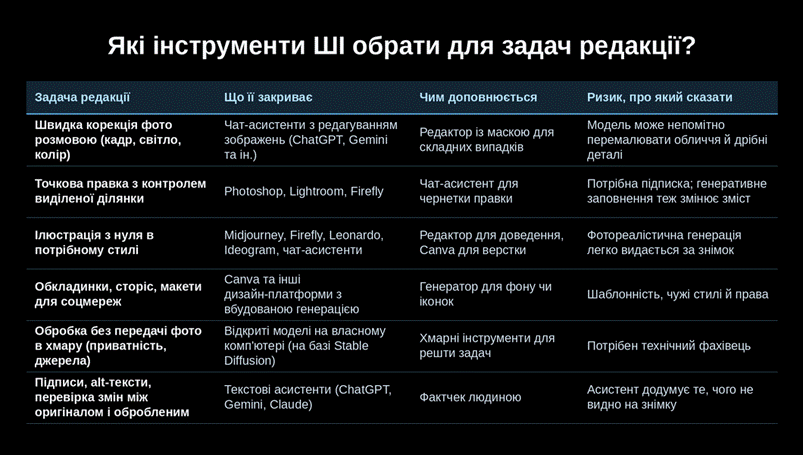
The choice of tool depends on what task the editorial office has to perform. The same prompt in ChatGPT, Midjourney, and Gemini can yield different compositions, styles, and levels of detail. For example, when preparing a phone scam cover, you can compare several options and choose one that has an easy-to-read subject line and leaves room for a headline. In Canva, this visual can be adapted to different publication formats.
One material may require several tools. For example, an editor creates the basis of an illustration in ChatGPT and refines it in Gemini if the light or textures look unnatural. For local retouching of a separate area, you can use Photoshop or Firefly. If the archival photo has too little resolution for printing, you can enlarge it in Topaz Photo and compare the result with the original before typesetting.
To upgrade skills, the speaker advises the following:
– generate three image variants in different styles for 10 minutes every day to better understand how AI reacts to words;
- perform at least one small task every day with the help of AI;
- create a joint table of the most successful prompts in the editorial office so that colleagues can take ready-made templates and change only keywords;
- configure basic export, contrast and sharpness presets once.
How to recognize the generated photo
Most media people evaluate the photo by eye, and Oksana Kostyuk sees nothing wrong with it. However, she listed the six most common signs of a generated face:
– AI does not reproduce natural asymmetry well, so the face looks too perfect or smiles unevenly;
– generated faces are often "prettier" than real ones. If something looks too good to be true, it probably isn't;
- emotions are flat, the gaze is directed "to nowhere";
– AI smooths everything to average parameters, so a big nose or protruding ears in such images almost never happens;
- there are no individual features in the face;
- such faces are worse remembered, and they are all "on the same face".
In addition to faces, it is worth checking:
– light and shadows: shadows must be coordinated with each other;
– anatomy: the "six fingers" test is no longer reliable, because the neural network draws hands better and better. Instead, look at the too-perfect teeth;
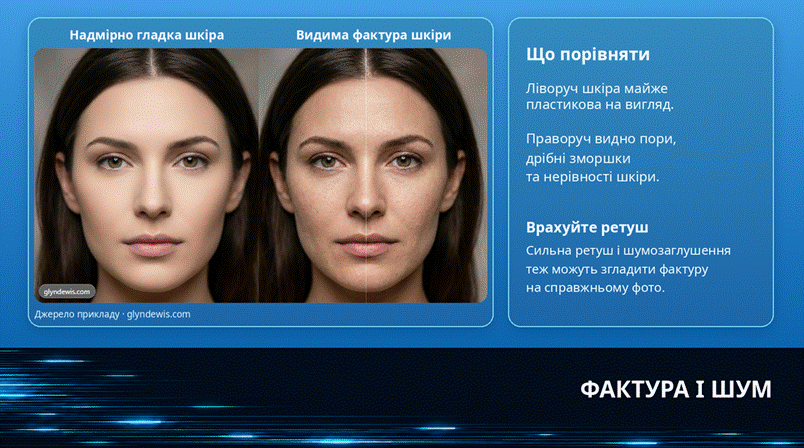
– skin texture: excessively smoothed skin surface, on which pores and small irregularities are almost invisible, may be a sign of AI generation or intensive retouching”;
– background and geometry: broken window lines, strange furniture legs or, on the contrary, suspiciously equal distances between objects.
The eye can be wrong, so check
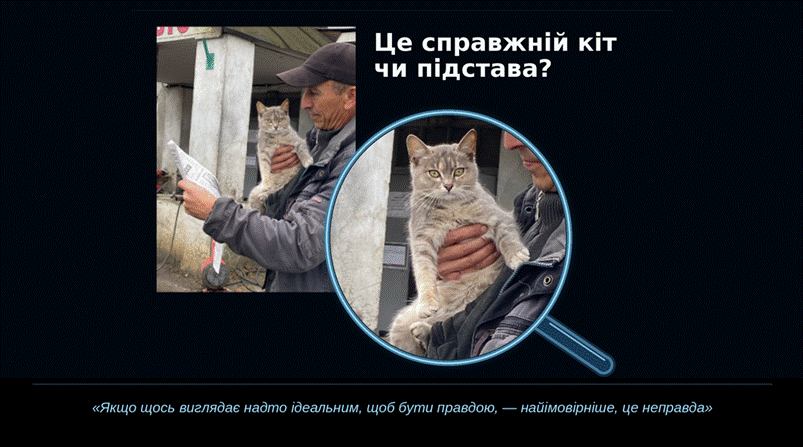
One of the most interesting moments of the webinar was the analysis of the photo sent by the editor of the newspaper "Vorskla" Oleksiy Pasyuga . In the picture, a man is holding a cat and a newspaper, and the cat is looking suspiciously perfectly into the camera. Some of the participants immediately decided that it was AI: they thought the man's fingers were too long and his hand was unnatural. Oksana Kostyuk also doubted, but checked the photo in two services, and none of them revealed signs of generation. During the webinar, Iryna Khromenko, the head of projects of the NUJU, called the author, and he confirmed that the picture is real. He sent it precisely to confuse the participants.
The speaker's conclusion: not everything that looks unnatural is generated. Everything must be checked. Verification services work according to different algorithms and also make mistakes, so it is better to combine several methods.
Method 1: Check the origin of the file. Content Credentials shows details about the author, tools, and creation history of the image. If there is no such data, this does not mean either a generation or a real photo.
Method 2: comparing parameters. You can match the parameters of the original and the copy, for example, from the messenger.
Method 3: Plugins. They look for the first post or pasted snippets, and some estimate the probability of generation as a percentage.
Method 4: reverse search using Google Lens or TinEye. This is how you can discover an old photo that is being shared as a snapshot of a recent event.
And the most important thing in our realities is the context of the event. Before publication, it is necessary to find the earliest references to the photo, check the date, place and event, check the information in reliable media, and if possible - with eyewitnesses. Generated or hyperbolized images are often distributed precisely to cause shock and strong emotions.
What to allow, what to limit and how to label
Oksana Kostyuk suggested that editors divide the work with images into three levels.
🟢 Green level: technical processing. Cropping, exposure, color, noise, dust removal, adaptation of a black and white photo for printing. All this can be done without AI, even in the basic editor on the phone. Such images can be published everywhere, including in the news. It is not necessary to mark the processing separately, although if you wish, you can specify what exactly was done.
🟡 Yellow level: generative change of the real picture. Replacing the sky, cleaning objects or people that are not important for the context, restoring archival photos, expanding the frame. This requires a processing signature describing the changes, such as "removed people in the background." Such images should be published outside the news bulletin. It is unacceptable to change the content of the picture of the event, for example, to add more explosions "for the sake of epicness".
🔴 Red level: fully generated image. Drawing, collage, stylization according to the description. Such images are published only as a labeled illustration for a column or analysis and without a photorealistic representation of real events and people.
How to mark correctly:
- the mark is placed directly next to the image, in the signature, and not at the bottom of the page or in the site rules. Photo and signature work together;
– the tag can be duplicated in alt-text and in a post on social networks;
– the generated image is called an “illustration” or “image”, but not a “photo”, “shot” or “frame”;
- do not delete metadata and, if the editors decided so, indicate the tool and date of creation.
Here are examples of disclaimers given by the speaker: "Illustration created with AI (tool name) / editorial name" or "Archive photo (source, year), restored with AI: stains and scuffs removed, content not changed."
Guideline for editorial policy
Oksana Kostiuk reminded that there are already rules in the EU, according to which it is necessary to label deepfakes, as well as images and texts created or changed by AI, which are published to inform on matters of public interest. Ukraine is not yet in the EU, and these norms do not apply to it. But editors can take the European code of practice and supplement them with the recommendations of the Ministry of Digital and National Council on AI in the media.
The basic principles that the speaker proposed to be included in the editorial policy are as follows.
The editor who publishes the image is responsible for the image , not the tool. It is not possible to refer to the fact that "AI did not catch up".
News photos are not altered generatively , only technical processing is permissible.
For each processed picture, the original and a record are kept : who processed it, when and with what tool.
Generated images are published as tagged illustrations only . They do not depict real people, events, victims and war scenes.
Readers' photos from social networks are checked before publication .
The first steps for the editors are to adopt a one-page policy, bookmark several review services, and regularly train the prompts, recording the most successful ones in a shared table.
AI works for the editorial office, not instead of it
Oksana Kostyuk stressed: media workers are engaged in journalism, not creating generative content. Retouching and adapting photos to different formats now takes much less time. Free time should be spent on fact-checking and talking to people.
- The trust of the reader is the main value of the publication. An honest mark does not reduce it, but increases it, the speaker is convinced.
To a humorous question from one of the participants, where to get money for 2027 and how AI will help in this, she answered:
- The neural network does not draw money, but it will help to calculate the budget, find grants, write an application and automate the routine. And the freed time can be devoted to work that really brings income.
The material was prepared based on the results of the webinar "Photo or AI? How not to fall into the trap of fakes and teach artificial intelligence to work for the editorial office", which NUJU held on November 12, 2026 for representatives of regional and local media. The webinar was organized within the framework of the priority direction of the NSHU "Restoration of Ukrainian media" with the support of the Ukrainian Media Fund Nordic.
Information service of NUJU
The primary source is the National Union of Journalists of Ukraine
The site uses cookies. The necessary ones are required for its operation (entering the cabinet, saving your choice). We enable analytical and marketing data only with your consent - in accordance with the Laws of Ukraine "On Personal Data Protection" and "On Electronic Communications". Consent can be changed or withdrawn at any time. For more details, see the Cookie Policy and Privacy Policy .